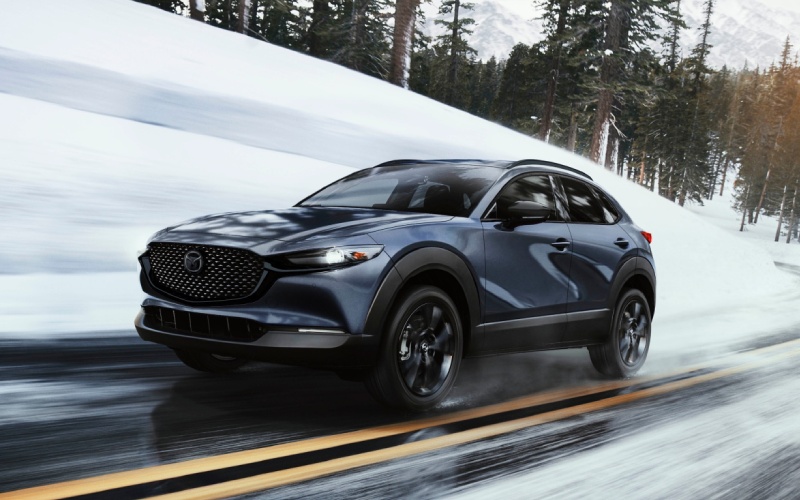
Bob Penkhus Mazda at Powers - Can I remote start and lock the 2026 Mazda CX-30 with the MyMazda App near Centennial, CO?
The 2026 Mazda CX-30 was designed to make everyday driving easier, and that ease now extends to your phone. If you are shopping near Centennial, CO and wondering whether you can remote start and lock your CX-30 using the MyMazda App, the answer is yes — with Mazda Connected Services, you can start the engine, lock or unlock the doors, and check key vehicle status reports from almost anywhere your phone has a signal. At Bob Penkhus Mazda at Powers, serving Parker, Littleton, and Highlands Ranch, we help drivers set up these features every day, so you can step into a cabin that is already settling in to your last-used climate settings and get moving with confidence.
Think about your routine around Centennial. Maybe you parked in the multi-level garage at The Streets at SouthGlenn and want the cabin comfortable before you carry shopping bags back to the car. Or you are headed out early along E-470 or I-25 toward the Denver Tech Center and want to confirm your doors are locked after that quick coffee stop on Arapahoe Road. With the 2026 Mazda CX-30 and the MyMazda App, these real-world tasks are handled with a tap.
What you can do from the MyMazda App on the 2026 Mazda CX-30
Mazda Connected Services is included for one year on the 2026 Mazda CX-30 and brings a suite of remote features to your smartphone. After enrollment, most drivers use these functions first because they solve daily ownership needs around town.
- Remote engine start and stop: Start or stop your engine from your phone so the cabin can begin warming or cooling based on your most recent settings, when conditions allow.
- Remote door lock and unlock: Secure your CX-30 or let a family member in without a key — helpful when your hands are full leaving The Streets at SouthGlenn.
- Vehicle status reports: View helpful info like whether doors are locked and lights are off, plus general status notifications for added peace of mind.
- Vehicle finder: Locate your CX-30 more quickly in larger lots around Centennial Center Park or near commuter parking areas off E-470.
- Service scheduling: Book maintenance with our service team and keep tabs on service reminders so your CX-30 stays in top shape.
Because these features rely on data connections, performance may vary based on cellular coverage or if your vehicle is parked underground. We can help you test everything during your delivery or first service visit.
How remote features fit daily life near Centennial, CO
Centennial’s mix of neighborhood streets, commuter corridors, and destination shopping creates lots of small moments where remote control pays off. If you park on the top level at SouthGlenn and a sudden Front Range breeze kicks up, simply lock the doors and confirm status on your phone before you descend the stairs. Meeting friends for an early hike at Cherry Creek State Park and want to jump right in with your gear? Use remote start as you lace up, then unlock as you approach. The app streamlines these transitions so you focus more on the day and less on logistics.
We also see commuters who split time between Centennial and the DTC appreciate the reassurance of a quick status glance before a long day — a locked icon on your phone is a quick confidence boost when you are already halfway to I-25.
Alexa Built-in vs. the MyMazda App — what’s the difference?
The 2026 Mazda CX-30 offers available Alexa Built-in to help you stay focused while driving. Use natural voice commands to adjust climate settings, change music, call a contact, or set a reminder without taking your hands off the wheel. That is in-vehicle voice control for the moments you are already on the move.
The MyMazda App, by contrast, is for remote control and ownership tools when you are away from the vehicle — things like remote start, door lock and unlock, status checks, and vehicle locating. Both systems complement each other. Alexa Built-in helps you while you are driving. The MyMazda App helps you before you start and after you park.
Quick setup checklist — from delivery to first remote start
Our team will walk you through setup at delivery or any time you stop by. Most Centennial drivers complete the basics in a few minutes.
- Download and sign in: Install the MyMazda App on your iOS or Android device and create or sign in to your MyMazda account.
- Link your vehicle: Add your 2026 Mazda CX-30 using the VIN found on the driver-side door jamb or lower windshield area.
- Enroll Connected Services: Follow the in-app prompts to activate Mazda Connected Services — your first year is complimentary.
- Verify permissions: Confirm owner authorization and any two-factor authentication steps to enable remote commands.
- Enable notifications: Turn on push alerts for lock status, general vehicle notifications, and service reminders.
- Test a command: In an open area with your CX-30 in Park, try remote lock and unlock, then remote start to confirm everything is working.
If you prefer, we can pre-set these features during delivery and review them with you, so you leave our lot comfortable and connected.
Confidence that extends beyond convenience
The 2026 Mazda CX-30 is about more than quick app taps. Standard i-Activ AWD® helps provide surefooted traction as you head up Dry Creek or merge onto I-25, while the i-Activsense® suite is designed to heighten awareness with features such as Blind Spot Monitoring and Rear Cross Traffic Alert. Inside, available Bose® 12-speaker premium audio with Centerpoint® and AudioPilot® brings premium sound to your daily commute, and Apple CarPlay® and Android Auto™ integration keep your digital life close at hand.
All of this integrates seamlessly with your phone and the MyMazda App, so you are connected in the ways that matter before, during, and after every drive.
Ownership support from Bob Penkhus Mazda at Powers
We are just a straight shot down I-25, and we also offer Purchase Online with FREE Delivery in Colorado if you prefer to complete most of the process from home. When it is time for maintenance, our certified technicians use genuine Mazda parts and advanced diagnostics to keep your CX-30 operating at its best. If you would like help configuring Alexa Built-in, activating Connected Services, or learning more about available features like the Active Driving Display or the 360º View Monitor on certain trims, we will walk you through everything step by step.
Our goal is to make sure your CX-30 fits seamlessly into life around Centennial — from school drop-offs and grocery runs to weekend trips and evening dinners at The Streets at SouthGlenn. If an app can save you time, reduce second-guessing, and add comfort to your day, that is a win in our book.
As with any connected feature, availability and functionality can vary by trim, equipment, and cellular coverage. We recommend confirming your must-have capabilities with our team and reviewing your owner’s manual for complete details. After your complimentary first year of Mazda Connected Services, a paid subscription is required to continue remote features.
Frequently Asked Questions:
Can I remote start and lock the 2026 Mazda CX-30 with the MyMazda App?
Yes. With Mazda Connected Services activated, you can use the MyMazda App to remotely start and stop the engine, lock and unlock the doors, check vehicle status reports, locate your vehicle, and schedule service. The service is complimentary for one year on the 2026 Mazda CX-30, after which a paid subscription is required. Functionality depends on cellular coverage and proper setup.
Will remote start precondition the cabin in my 2026 Mazda CX-30?
Remote start allows the engine to begin warming or cooling the cabin based on your most recent climate settings, when conditions allow. For hands-free in-vehicle adjustments while driving, the CX-30 offers available Alexa Built-in to change climate, audio, and more using your voice.
Do I need a specific trim to use remote features on the 2026 Mazda CX-30?
The 2026 Mazda CX-30 includes Mazda Connected Services capability across the lineup. Feature availability can vary by trim and equipment, so we recommend reviewing your configuration with our team to confirm the exact functions you want.
Can I share app access with another driver in my household?
Yes. The primary owner can authorize additional users within the MyMazda App so trusted family members can access approved remote features. We can help you set up secondary users and confirm the right permissions during your visit or via a quick phone call.
If you are ready to experience how the MyMazda App and the 2026 Mazda CX-30 work together, visit us at Bob Penkhus Mazda at Powers or start online. We will set up your Connected Services, demonstrate remote start and lock features, and make sure everything is tailored to your routine around Centennial, CO.