Bob Penkhus Mazda at Powers - Does Google built-in on the 2026 Mazda CX-5 make commuting around Littleton, CO easier?
Daily driving should feel simple, not stressful. That’s where the 2026 CX-5 with Google built-in stands out—especially for Littleton commuters bouncing between Santa Fe Drive, C-470, and neighborhood streets during busy hours. Mazda paired its calm, driver-focused cabin with an available 15.6-inch integrated touchscreen to make tasks you do every day—routing, finding coffee, streaming a podcast—feel natural from the start.
Google built-in transforms the interface into something you already understand. The home screen is customizable, the menus are straightforward, and the system responds like your favorite device. Google Maps brings fresh traffic and place information, and when you sign into your Google Account, you’ll have saved places and previous searches right there in the vehicle. That means quick, accurate routes to the RTD Mineral Station, a shortcut to Aspen Grove, or a fast plan around congestion on your way to an evening at Hudson Gardens.
Beyond navigation, the system connects your everyday digital life to the drive. The Google Play Store offers a curated selection of compatible apps so you can select your go-to music, news, and more. And coming soon to cars with Google built-in is Google Gemini, an AI assistant from Google designed to let you speak naturally—ask it to plan a stop, adjust the route, or answer a follow-up question, all hands-free. It’s the kind of seamless support that feels made for unpredictable traffic on south Broadway or a quick pivot when your plans change near Chatfield.
Because the screen is large and integrated, it’s easy to read glanceable information like turn prompts or lane guidance, and the interface is designed to reduce clutter. Pair that with the CX-5’s quieter, more spacious interior and you have an environment that supports focus. If you’ve ever tried to wrangle complex menus at the C-470 and Santa Fe interchange, you’ll appreciate how this setup keeps things simpler and safer.
Let’s put the features into a Littleton commute:
- Start-of-day routine with fast access to your last route or saved workplace
- Voice-guided navigation to avoid traffic along Santa Fe or Broadway
- Quick detours for coffee or groceries with search results that reflect current hours
- Saved favorites for parks, after-school pickup, or weekend trails
- Curated apps for music and news that launch from a familiar interface
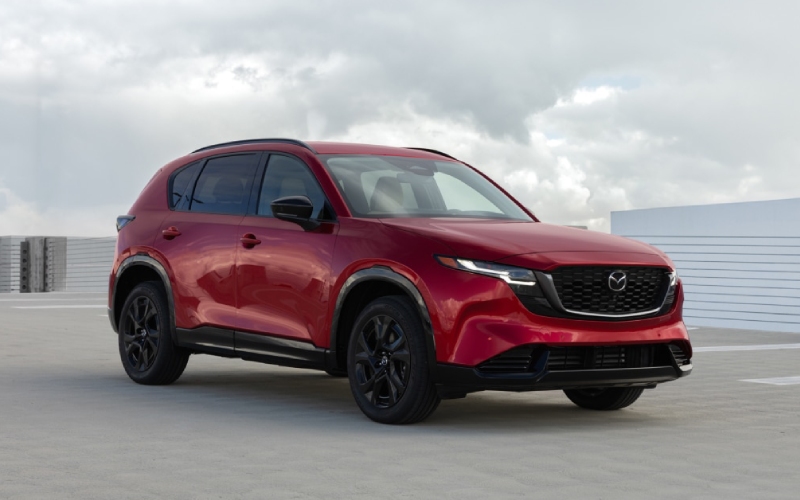
It also helps that the rest of the SUV matches this tech-forward ease. Standard i-Activ AWD keeps acceleration confident when roads are slick, the recalibrated SkyActiv-G 2.5 pairs smooth response with quiet cruising for stretches along C-470, and the expanded cabin space means second-row riders have more leg and headroom. A lower cargo lift-in height makes loading groceries or sports gear less of a lift after a long day, and available 19-inch wheels and the evolved Kodo design give the SUV a planted, refined look in the school lane.
Frequently Asked Questions:
Do I need to use a phone to run Google Maps in the 2026 CX-5?
No. With Google built-in, Google Maps runs natively in the vehicle. That means you can access maps, live traffic, and place details directly on the 15.6-inch screen. When you sign into your Google Account, you can also see your saved places and past searches for faster routing.
Can I use my voice to find places or change routes?
Yes. Voice functionality is designed for natural speech so you can keep hands on the wheel. You can ask for destinations, search along your route, or modify plans with follow-up questions. Coming soon to cars with Google built-in is Google Gemini, an AI assistant from Google created to handle more complex, conversational requests.
What kinds of apps are available in the Google Play Store?
You’ll find a curated selection of in-vehicle compatible apps for everyday use, including popular options for music, news, and video streaming when parked. The goal is to keep essential entertainment and information close at hand in a familiar way without cluttering the interface.
Is the system difficult to learn?
The interface is designed to feel like the devices you already use. The home screen layout is customizable, the menus are straightforward, and the large display makes it easy to see and act quickly. Most drivers feel at home after a single commute, especially with voice controls managing common tasks.
For Littleton drivers, the benefit is simple: the CX-5’s technology fits your routine rather than asking you to relearn it. That’s especially helpful when your schedule is full and the day demands flexibility. From a design standpoint, the evolved Kodo proportions bring a confident, modern look to your driveway, while the expanded interior dimensions make daily life easier—bigger door openings for quick drop-offs, more usable cargo height for strollers or gear, and an optional panoramic sunroof that brightens the cabin for passengers of all ages.
If you are weighing crossovers and want cabin tech that simply works, the 2026 CX-5 should be on your shortlist. It’s the rare blend of serenity and capability that keeps commutes calm and weekends fun. Bob Penkhus Mazda at Powers can walk you through the system in person, set up a personalized test drive, and help you tailor the SUV with the features that match how you live.
We are proud to be serving Parker, Littleton, and Highlands Ranch with a knowledgeable team that understands Colorado driving. When you are ready, schedule time to explore the 15.6-inch screen, try voice controls, and run a route you use every day. You’ll see how Google built-in turns the CX-5 into the confident, connected partner that keeps your day moving—no matter what traffic decides to do.